Afficher
les minuteries d'exercices en direct
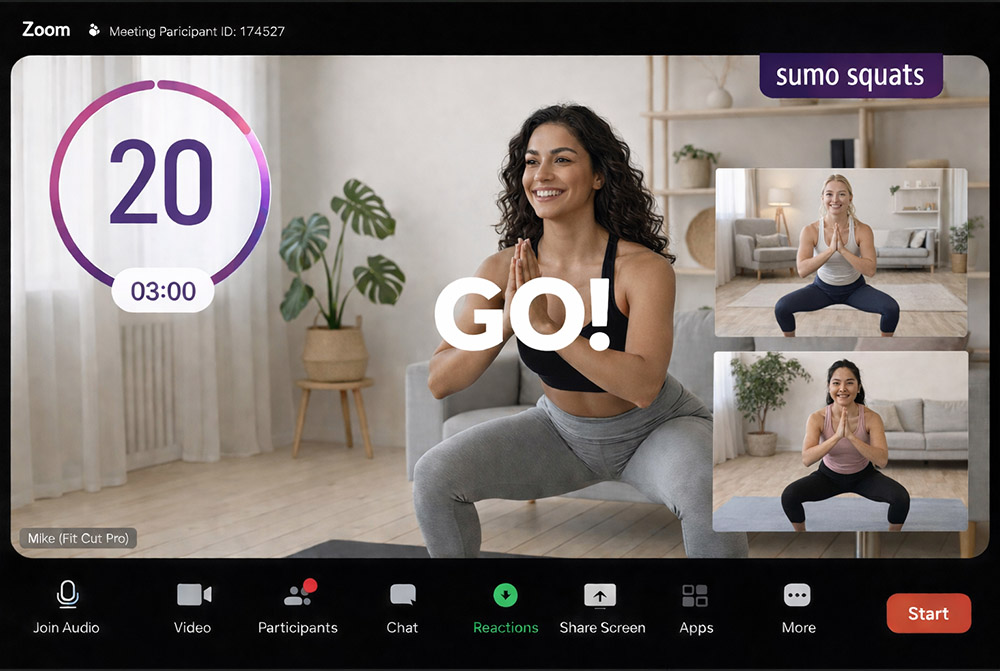
Transformez votre caméra Zoom en diffusion professionnelle d'entraînement. Minuteries, noms d'exercices et aperçus — affichés en direct pour vos participants, directement sur votre flux vidéo.
Vos entraînements Zoom méritent mieux
La plupart des entraîneurs en ligne crient les noms d'exercices et les comptages, ou partagent une application de minuterie basique qui prend tout l'écran.
Les participants ne peuvent pas vous voir démontrer, ils perdent le fil et l'expérience semble non professionnelle.
Le Timer Zoom de Fit Cut Pro superpose votre programme directement sur votre flux caméra — comme une émission TV fitness.
Passer en direct avec les overlays en 4 étapes
Créer votre entraînement
Créez un programme avec exercices, durées et séries.
Sélectionner le mode Timer Zoom
Choisissez le mode Timer Zoom pour préparer l'overlay.
Sélectionner la caméra dans Zoom
Choisissez Fit Cut Pro comme source caméra dans Zoom.
Démarrer votre session
Appuyez sur play — minuteries et libellés avancent automatiquement.
Minuteries
Grands comptes à rebours clairs pour chaque exercice et repos sur votre caméra.
Nom d'exercice actuel
Nom d'exercice affiché de manière proéminente pour tous les participants.
Aperçu exercice suivant
Clip de démo de l'exercice suivant avant chaque transition.
Compteurs tours & séries
Tour actuel et comptage de séries maintiennent tout le monde sur la bonne voie.
Caméra + Graphiques
Les participants vous voient plus les graphiques — pas de partage d'écran nécessaire.
Toute taille de groupe
Fonctionne pour 1 à 1 ou cours de 100 personnes. Aucune installation pour les participants.
Without Fit Cut Pro
- ✗Crier les noms d'exercices et comptages verbalement
- ✗Partager un minuteur basique (ne peuvent pas vous voir)
- ✗Les participants perdent le fil de l'entraînement
- ✗Non professionnel comparé aux cours en présentiel
- ✗Pas d'aperçu exercice suivant ni de repères visuels
With Fit Cut Pro
- ✓Graphiques superposés sur votre caméra — ils vous voient + minuteries
- ✓Les minuteries avancent automatiquement par exercice
- ✓Noms d'exercices et aperçus suivants à l'écran
- ✓Expérience de qualité professionnelle
- ✓Rien à installer pour les participants