Hoe voeg je
timers en grafiken toe
Professionele workout-video's hebben countdown-timers, oefenlabels en gebrande overlays. Met Fit Cut Pro worden alle automatisch gegenereerd uit je trainingsplan — geen designvaardigheden nodig.
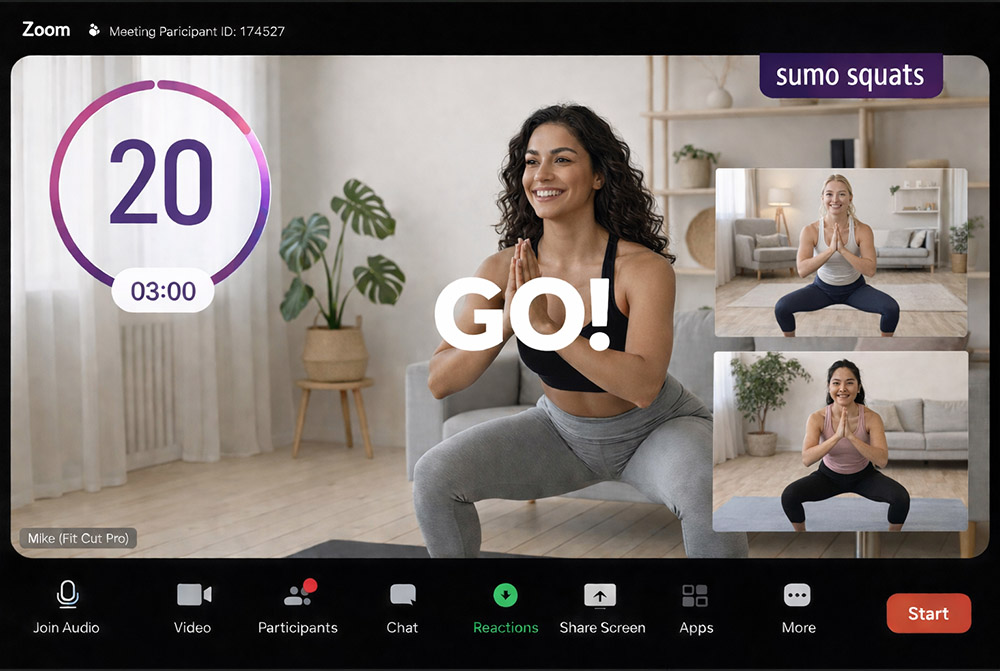
Automatisch gegenereerde grafiken
Professionele timer-grafiken toevoegen aan workout-video's vereist traditioneel After Effects, keyframing en uren designwerk per video.
De meeste trainers slaan deze stap volledig over, wat resulteert in eenvoudige video's zonder visuele hints.
Fit Cut Pro genereert alle grafiken automatisch. Maak een trainingsplan — timers, labels, previews en overlays volgen.
Voeg timers & grafiken toe in 3 stappen
Maak je trainingsplan
Voeg oefeningen, duur, rustperiodes en sets toe.
Grafiken automatisch gegenereerd
Fit Cut Pro maakt timers, labels en overlays uit je plan.
Exporteren of live gaan
Exporteer als MP4 of toon live op Zoom met overlays.
Countdown-timers
Visueel aftellen voor elke oefening en rustperiode. Automatisch gedimensioneerd en gepositioneerd.
Oefennaam-labels
Huidige oefennaam op het scherm, wisselt automatisch bij elk segment.
Volgende-oefening preview
Een previewclip van de volgende oefening verschijnt voor elke overgang.
Set- & rondetellers
Rondenummer en settelling weergegeven voor rondegebaseerde oefeningen.
Logo-overlay
Upload je logo eenmaal en het verschijnt op elke video. Pas positie en grootte aan.
Aangepaste intro & outro
Gebrande intro- en outroschermen omkaderen je video.
Without Fit Cut Pro
- ✗Timer-grafiken maken in After Effects of vergelijkbaar
- ✗Tekstlabels handmatig positioneren voor elke oefening
- ✗Countdown-animaties met de hand keyframen
- ✗Alles opnieuw doen als de workout verandert
- ✗1-3+ uur designwerk per video
With Fit Cut Pro
- ✓Timers automatisch gegenereerd uit het trainingsplan
- ✓Oefenlabels verschijnen automatisch
- ✓Countdown-animaties zijn ingebouwd
- ✓Verander het plan — grafiken updaten direct
- ✓Grafiken klaar in de tijd die nodig is om een plan te maken