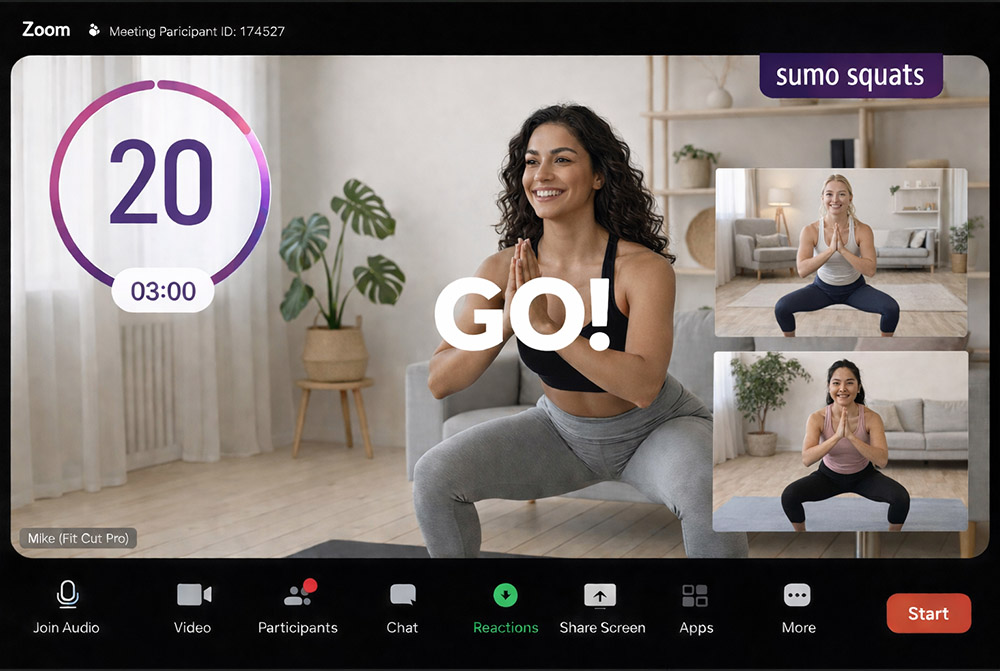
How to Add Timers and Graphics
Professional workout videos have countdown timers, exercise labels, and branded overlays. With Fit Cut Pro, all of these are generated automatically from your workout plan — no design skills needed.

Graphics That Are Auto-Generated
Adding professional timer graphics to workout videos traditionally requires After Effects, keyframing, and hours of design work per video.
Most trainers skip this step entirely, resulting in plain videos with no visual cues for their clients.
Fit Cut Pro generates all graphics automatically. Build a workout plan — timers, labels, previews, and overlays follow.
Add Timers & Graphics in 3 Steps
Build Your Workout Plan
Add exercises, durations, rest periods, and rounds.
Graphics Auto-Generated
Fit Cut Pro creates timers, labels, and overlays from your plan.
Export or Go Live
Export as MP4 or display live on Zoom with overlays.
Countdown Timers
Visual countdown for every exercise and rest period. Automatically sized and positioned.
Exercise Name Labels
Current exercise name displayed on screen, changing automatically with each segment.
Next Exercise Preview
A preview clip of the upcoming exercise appears before each transition.
Set & Round Counters
Round number and set count displayed for round-based exercises.
Logo Overlay
Upload your logo once and it appears on every video. Customize position and size.
Custom Intro & Outro
Branded intro and outro screens bookend your video.
Without Fit Cut Pro
- ✗Create timer graphics in After Effects or similar
- ✗Manually position text labels for each exercise
- ✗Keyframe countdown animations by hand
- ✗Re-do everything when the workout changes
- ✗1-3+ hours of design work per video
With Fit Cut Pro
- ✓Timers auto-generated from workout plan
- ✓Exercise labels appear automatically
- ✓Countdown animations are built in
- ✓Change the plan — graphics update instantly
- ✓Graphics ready in the time it takes to build a plan