Comment créer
des vidéos d'entraînement professionnelles
Pas besoin d'apprendre Premiere Pro ou d'engager un monteur. Avec Fit Cut Pro, produisez des vidéos d'entraînement soignées et brandées en quelques minutes — avec juste votre téléphone et un programme.
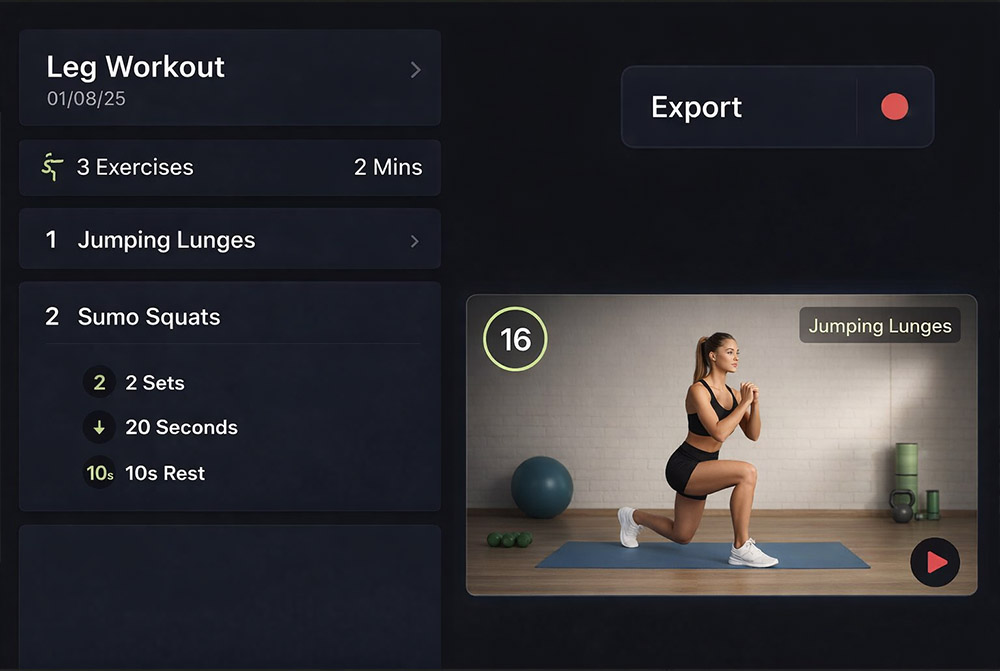
Vous êtes entraîneur, pas monteur vidéo
Vos clients veulent du contenu professionnel — des vidéos avec des libellés d'exercices, des minuteries, des transitions fluides et votre branding. Mais apprendre le montage prend des semaines et un monteur coûte des centaines par vidéo.
La plupart des entraîneurs abandonnent le contenu vidéo ou se contentent d'enregistrements de faible qualité.
Fit Cut Pro change la donne. Concentrez-vous sur créer de bons entraînements — le logiciel fait le reste.
Créer une vidéo d'entraînement en 4 étapes
Enregistrer des clips d'exercices
Utilisez votre téléphone pour enregistrer de courts clips de chaque exercice.
Créer votre programme
Ajoutez exercices, durées, temps de repos et séries.
Prévisualiser & Personnaliser
Visualisez votre vidéo avec minuteries et libellés auto-générés.
Exporter & Partager
Téléchargez votre MP4 finalisé en jusqu'à 4K.
Minuteries automatiques
Les minuteries sont générées depuis votre programme — durée d'exercice, temps de repos et nombre de séries.
Libellés & Graphiques d'exercices
Noms d'exercices, numéros de séries et repères visuels apparaissent automatiquement.
Logo & Branding
Téléchargez votre logo une fois et il est superposé sur chaque vidéo.
Musique de fond
Ajoutez de la musique libre de droits depuis la bibliothèque intégrée. Mixez les niveaux de volume.
Export jusqu'à 4K
Exportez des fichiers MP4 standard en résolution jusqu'à 4K.
Basé navigateur
Aucun logiciel à télécharger. Tout fonctionne dans votre navigateur web.
Without Fit Cut Pro
- ✗Apprendre un logiciel de montage complexe
- ✗Placer et chronométrer manuellement chaque clip
- ✗Concevoir des graphiques de minuterie à partir de zéro
- ✗Ajouter des libellés texte manuellement pour chaque exercice
- ✗Passer 1-3 heures par vidéo d'entraînement
With Fit Cut Pro
- ✓Aucune compétence de montage — créez un programme à la place
- ✓Les clips d'exercices sont auto-arrangés depuis votre programme
- ✓Minuteries générées automatiquement
- ✓Libellés et graphiques d'exercices apparaissent par défaut
- ✓Vidéo terminée en 5-10 minutes