Generate Pro Thumbnails with AI
Turn any workout frame into a scroll-stopping thumbnail. Pick a style, choose your colors, and let AI do the design work — for YouTube, Instagram, or your brand logo.
No Photoshop. No Canva. No hiring a designer. Just click Generate.
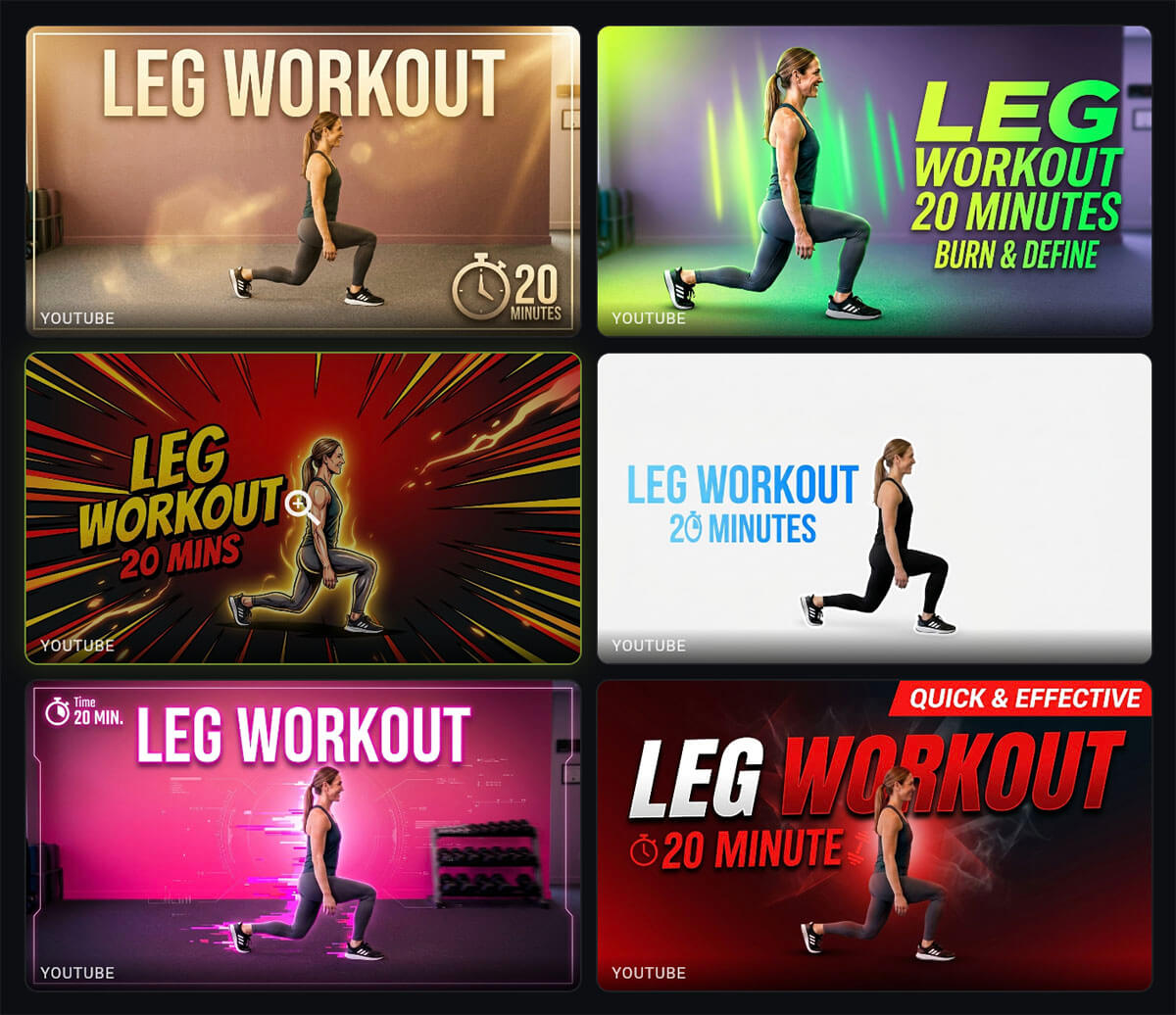
Your Thumbnail Is the First Thing People See
A great workout deserves a great thumbnail. It's what makes someone click your video instead of scrolling past. But creating eye-catching thumbnails has always meant juggling Photoshop, stock photos, and hours of design work.
Most personal trainers aren't graphic designers — and they shouldn't have to be. Hiring one for every video gets expensive fast, and generic Canva templates make every channel look the same.
Fit Cut Pro's AI Thumbnail Generator takes a frame from your actual workout, keeps your exact pose and expression, and wraps it in a professional, stylized design — in seconds.
One Tool, Every Platform
Generate thumbnails in the right aspect ratio for every platform you post to.
YouTube
16:9
Landscape thumbnails optimized for video feeds and search results.
9:16
Portrait stories and reels covers that dominate the scroll.
Logo
1:1
Circular brand logos with dedicated style presets.
8 Visual Styles for Any Brand
Each style transforms the scene around your trainer — from cyber-neon to minimalist studio — while keeping the pose and expression untouched.
Default
Clean, balanced composition that lets the trainer and colors speak for themselves.
Electric
Glitch effects, scanning lines, and volumetric cyber backlighting.
Minimalist
High-key, seamless white background with soft wrap-around studio lighting.
Golden
Comic-book-style thick outlines, speed lines, and a golden glowing aura.
Neon
Hyper-defined textures, neon accents, volumetric rim lighting, shallow depth of field.
GoPro
Wide-angle first-person vlog feel — natural gym lighting, authentic and unfiltered.
Golden Hour
Warm sepia color grade, film grain, lens flares, and high micro-contrast.
Soft
High-key lighting on seamless white — premium fashion-fitness photography.
Logo Mode Has Its Own Styles
Switch to Logo mode and choose from 5 purpose-built logo styles:
Create a Thumbnail in 4 Steps
From workout frame to finished thumbnail in under a minute.
Import a Frame
Upload a frame from your workout video — or capture one directly inside Fit Cut Pro.
Pick Colors & Style
Choose a color palette and one of 8 visual styles (or 5 logo styles in Logo mode).
Generate
Hit Generate. AI creates a high-res thumbnail preserving your trainer's exact pose and look.
Download & Use
Save to your gallery, download, and upload to YouTube, Instagram, or anywhere.
Built for Fitness Creators
Every detail is tailored for personal trainers who want professional thumbnails without the design overhead.
Pose-Preserving AI
The AI keeps the trainer's exact body position, facial expression, and appearance from the reference frame. It enhances the scene — not the person.
Color Presets & Custom
Choose from curated color palettes or pick your own brand colors. The AI weaves them into backgrounds, accents, and lighting.
Multi-Format Gallery
Your generated images live in a flexible gallery that displays 16:9, 9:16, and 1:1 images side by side at their natural proportions.
Style Presets
Eight thumbnail styles and five logo styles — from high-energy Electric neon to clean Minimalist studio to retro Golden Hour film.
Workout Context
Enter your workout name and duration — the AI incorporates them into the thumbnail design as professional text overlays.
High Resolution
All thumbnails are generated at high resolution for crisp results on high-density screens and large video player previews.
The Old Way vs. the AI Way
Without AI Thumbnails
- ✗Open Photoshop or Canva for every video
- ✗Search for stock backgrounds and overlays
- ✗Manually cut out the trainer from the frame
- ✗Spend 30–60 minutes on each thumbnail
- ✗Pay a designer $10–50 per thumbnail
- ✗End up with generic templates that all look alike
With Fit Cut Pro AI
- ✓Upload a frame, pick style and colors, click Generate
- ✓AI creates unique backgrounds and effects around you
- ✓Trainer stays pixel-perfect — no manual cutouts
- ✓Done in under a minute
- ✓Included in your subscription — no per-image fees
- ✓Every thumbnail is unique to your brand and workout
Monthly Image Credits
AI thumbnail generation is included in every paid plan. Your remaining credits are shown right on the Generate button.