Record Workout Videos With the Timer and Graphics Already On Screen
Press record, train, stop. Fit Cut Pro's browser-based recorder overlays your countdown timer, exercise names, next-up preview and logo while you film, so the video is finished the moment your session ends. Video recording software made for fitness instructors, not for streamers.
Recording software for fitness instructors, not raw footage
Recording a class on Zoom, OBS or your phone gives you raw footage. The timers, exercise names and rest screens still have to be added afterwards, interval by interval, in an editor. For a 45-minute session that is an evening of work.
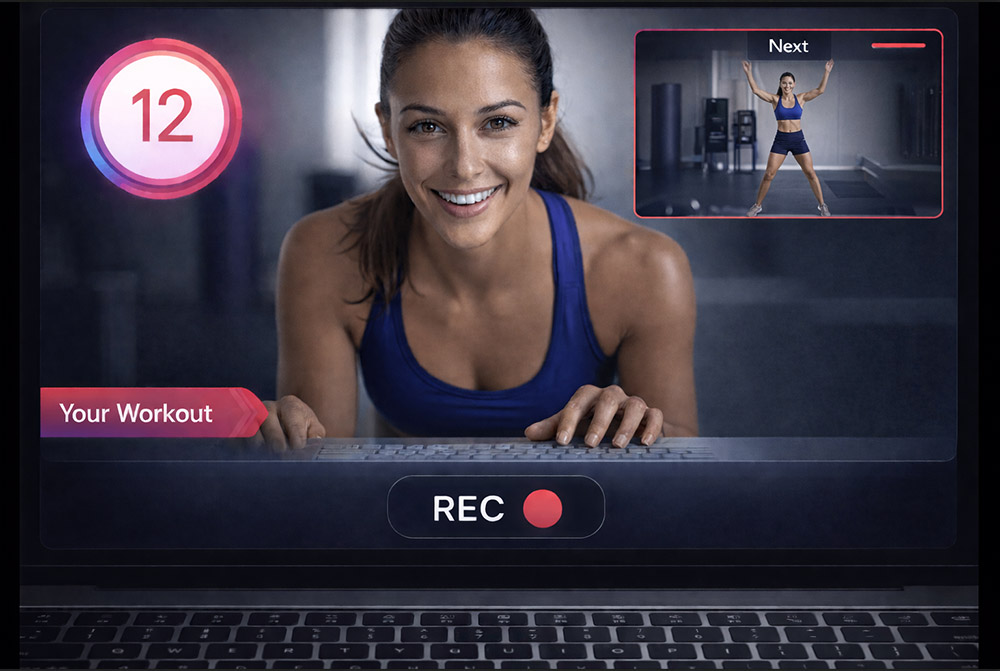
The Fit Cut Pro Recorder starts from your workout plan instead of a blank recording. It runs the session for you, drawing the countdown, the current exercise and the next one straight onto the video as you perform, then adds the intro, outro and transitions when you stop. What you download is the finished workout video.
It runs in Chrome on a Mac, Windows PC or Chromebook. There is nothing to install and nothing to render later.
How the recorder works
Five steps from plan to published video.
- 1
Pick a workout plan
Choose any plan from your account: a circuit, a strength session, a Tabata block or an AMRAP. The recorder reads the exercises, durations and rest periods from it.
- 2
Allow camera and microphone
The browser asks once. Choose the webcam, phone or capture device you want, and the quality (720p or 1080p).
- 3
Countdown and go
A five-second countdown gives you time to step back. Beeps mark each transition, or mute them if you prefer to cue verbally.
- 4
Train while the graphics run
The countdown timer, exercise name, next-exercise preview and rest screens play over your camera feed in real time. You coach; the display keeps the clock.
- 5
Stop and download
The video is processed with your intro, outro and transitions already in place. Short takes download to your computer; long sessions are backed up to your cloud Recorded panel as you go.
What your clients see on screen
Every element is drawn live from the plan and your design settings.
Live countdown timer
Work and rest intervals count down on screen with transition beeps, exactly as planned. Your clients follow the clock while you coach.
Exercise name and next-up preview
The current exercise stays labelled and the next one appears as a preview clip before the rest ends, at the size you choose.
Your logo, colours and font
Branding comes from your design settings. Every recording looks like your studio without touching a single title card.
Intro, outro and transitions
An opening screen, exercise transitions and an ending screen are added automatically when the recording is processed.
Demo clips during rest
If an exercise has a clip in your library, it plays during the rest period so clients know what is coming.
AMRAP and circuit layout
Show every movement and rep count of a round on one screen, in a grid or picture-in-picture layout, with clips alongside.
How to record workout videos that look professional
The software handles the graphics. These six habits handle the footage.
Use your phone as the camera
A laptop webcam is fine to start. A phone is noticeably sharper: on a Mac, an iPhone connects as a webcam through Continuity Camera; on Mac or Windows, Camo does the same for iPhone and Android. Fit Cut Pro records from any camera the browser lists.
Frame for the overlay
Record in landscape, put the camera at chest height on a tripod, and leave room around you. The timer and exercise name sit at the edges of the frame, so a full-body shot with some air looks best.
Face the light
Stand facing a window or a soft light. Avoid windows behind you; a backlit trainer turns into a silhouette no overlay can fix.
Get the voice clean
Built-in microphones work for cues. A lapel or USB microphone makes coaching audio clearer. Add music afterwards in the Music editor rather than playing it in the room, so the levels stay under your control.
Plan the session, then film it once
Because the recorder follows your plan, you do not stop to check the clock. Rehearse the transitions once, then record the whole class in one take.
Keep the browser current and the connection stable
Recording uses modern browser video encoding, so an up-to-date Chrome matters. A stable connection keeps long sessions backing up to the cloud while you record.
Recorder, Creator or Zoom app: which one to use
All three share the same plans, clip library and branding. They differ in where the workout happens.
Recorder
You perform the workout on camera and want the finished video immediately. Best for follow-along classes and personal coaching videos.
This pageWorkout Creator
You build the video from your exercise clip library without filming a new session. Best for programmes, member libraries and portrait social clips.
Workout video editorZoom timer app
You teach live and your participants need to see the timer and exercise names on your Zoom camera in real time.
Zoom workout timer appWorkout video recorder FAQ
See the recorder in action
Camera and microphone set up, the countdown, the live overlay while you train, and the finished recording waiting in the cloud.