Short answer
Seconds Pro is an interval timer app for your phone: it counts sets and rests for you while you train. Fit Cut Pro puts that timer into the video itself, with exercise names, rest screens, your logo and music, and exports a follow-along MP4 or shows it live in Zoom. Seconds Pro is a one-time app purchase; Fit Cut Pro is from $49.99 per month with a 14-day free trial.
| Fit Cut Pro | Seconds Pro | |
|---|---|---|
| Countdown timers and exercise names | Generated from your workout plan | On-screen timer for the person training |
| Live overlay inside Zoom | Yes, the Go Live Zoom app | Screen-share only |
| Edit a class you already filmed | AI Editor detects every exercise and rest | No |
| Learning curve | Minutes, no editing skills | Minutes |
| Price | $49.99, $99.99 or $199.99 per month; 14-day free trial | One-time app purchase |
| Best for | Trainers publishing follow-along workouts every week | A personal interval timer during your own workouts |
When Seconds Pro is the better choice: Seconds Pro is the better choice if you only need a personal interval timer on your phone and you are not publishing or streaming videos.
Frequently asked questions
- Can I use Seconds Pro to make a workout video?
- Not directly. It is a timer, not a video maker; you would screen-record it and edit the footage in around it. Fit Cut Pro draws the timer, names and rest screens onto the video for you.
- Does Fit Cut Pro have Tabata, HIIT and circuit timers?
- Yes. Any work and rest structure, sets and rounds, plus an AMRAP display for circuits, in the video and in Zoom.
- Can Fit Cut Pro show the next exercise?
- Yes. In the last seconds of a rest a small window shows the next exercise so nobody scrambles.
- What does Fit Cut Pro cost?
- Starter $49.99, Pro $99.99 and Ultimate $199.99 per month; 14-day free trial, no credit card.
- Do I need a computer?
- Fit Cut Pro runs in a desktop browser; the Zoom app runs inside Zoom. Seconds Pro runs on a phone.
Side-by-Side Comparison
Fit Cut Pro vs Seconds Pro — full fitness video platform vs standalone interval timer app.
| Feature |  | SP Seconds ProHIIT / Tabata Timer App |
|---|---|---|
| HIIT / Tabata Interval Timer | Built-in — intervals, rounds, rep counts, countdown | Best-in-class interval timer with rich sound cues |
| CrossFit AMRAP Display | All exercises, rep counts, and video clips on one screen | Timer only — no multi-exercise layout |
| Exercise Video Clips | Upload once, auto-linked to every workout | Not supported |
| Workout Video Production | Export a fully edited workout video (MP4, up to 4K) | Timer app only — no video output |
| Live Zoom Overlay | Virtual camera — live timer and graphics on Zoom/Meet/Teams | Shows timer on your phone; no video-call integration |
| Platform | Browser — works on Mac, Windows, any modern OS | iOS app (iPhone / iPad / Apple Watch) |
| Custom Branding & Logo | Upload your logo once; appears on every video | Not supported |
| Exportable Content for YouTube / Instagram | Export YouTube 16:9 and Instagram 9:16 videos and thumbnails | Nothing to export |
| Price | From $49.99/month (full production suite) | One-time purchase ~$5 (timer only) |
HIIT / Tabata Interval Timer
Fit Cut ProBuilt-in — intervals, rounds, rep counts, countdown
Best-in-class interval timer with rich sound cues
CrossFit AMRAP Display
Fit Cut ProAll exercises, rep counts, and video clips on one screen
Timer only — no multi-exercise layout
Exercise Video Clips
Fit Cut ProUpload once, auto-linked to every workout
Not supported
Workout Video Production
Fit Cut ProExport a fully edited workout video (MP4, up to 4K)
Timer app only — no video output
Live Zoom Overlay
Fit Cut ProVirtual camera — live timer and graphics on Zoom/Meet/Teams
Shows timer on your phone; no video-call integration
Platform
Fit Cut ProBrowser — works on Mac, Windows, any modern OS
iOS app (iPhone / iPad / Apple Watch)
Custom Branding & Logo
Fit Cut ProUpload your logo once; appears on every video
Not supported
Exportable Content for YouTube / Instagram
Fit Cut ProExport YouTube 16:9 and Instagram 9:16 videos and thumbnails
Nothing to export
Price
Fit Cut ProFrom $49.99/month (full production suite)
One-time purchase ~$5 (timer only)
The Verdict
Seconds Pro is excellent at what it does — a reliable HIIT, tabata, and circuit timer on your phone. If that's all you need, keep using it.
Fit Cut Pro is for trainers who have outgrown "just a timer" — who want to record polished workout videos, run live Zoom classes with professional overlays, and publish to YouTube and Instagram. Seconds Pro runs your workout. Fit Cut Pro runs your fitness business.
Looking for a Seconds Pro alternative?
Most trainers who search for a Seconds Pro alternative are not unhappy with the timer. They have outgrown a timer that lives on their phone. The moment you start filming workouts, teaching on Zoom or posting to YouTube, a countdown on your own screen is invisible to the people who need it. Here is what usually triggers the switch:
- Clients cannot see the timer. Seconds Pro runs on your device. Fit Cut Pro puts the countdown, exercise name and next-up preview on your Zoom camera and inside the recorded video.
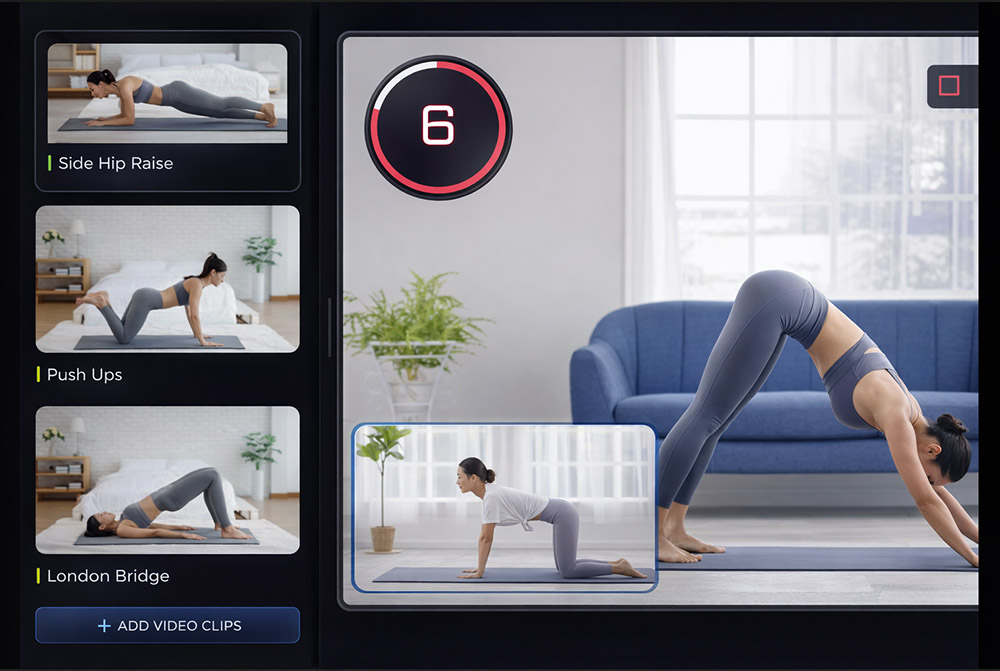
- You are editing the same video every week. Fit Cut Pro builds the video from your workout plan and your exercise clip library, so a new session is a new plan, not a new edit.
- You need a finished MP4, not a running timer. The Recorder and the Workout Creator both export MP4 files in up to 4K with timers, labels, logo and licensed music already applied.
- Your workouts are circuits and AMRAPs. The AMRAP display shows every movement and rep count on one screen, with demo clips, in recordings and live on Zoom.
Other Seconds Pro alternatives trainers consider: Smart WOD Timer, IntervalCam, the Fit Cut Pro Zoom workout timer app. Each one is a timer or overlay tool first; Fit Cut Pro is the only option on this list that also records and exports the finished workout video.
What You Get Beyond a Timer
Everything Seconds Pro doesn't do — all inside one platform
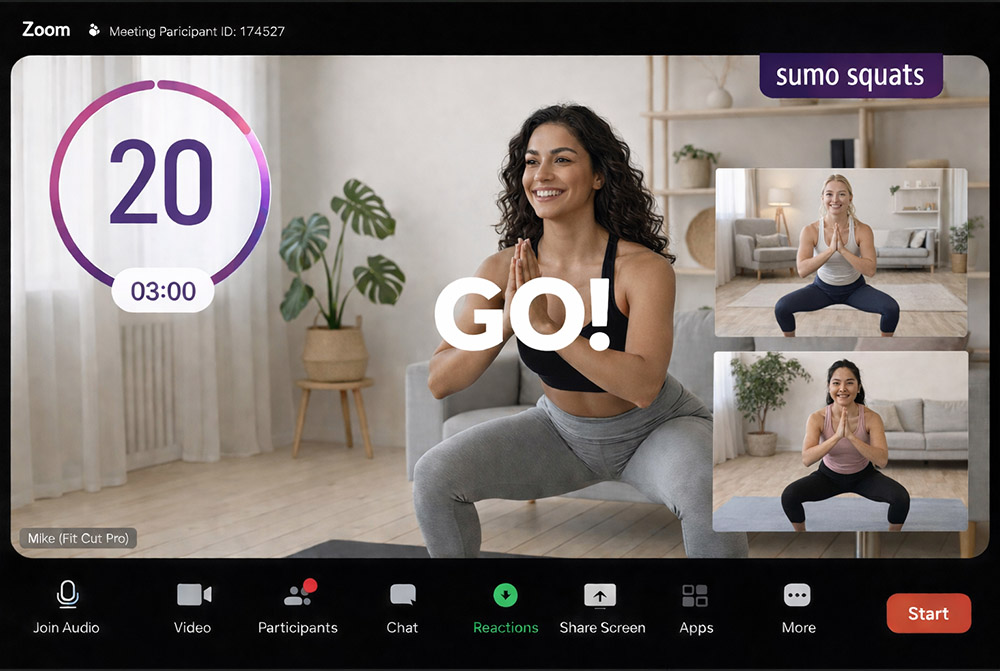
Professional Overlays for Live Zoom Workouts
Seconds Pro stops at your phone. Fit Cut Pro puts the timer, exercise name, countdown, and rep count live on your Zoom camera — so every participant sees the workout graphics in real time.
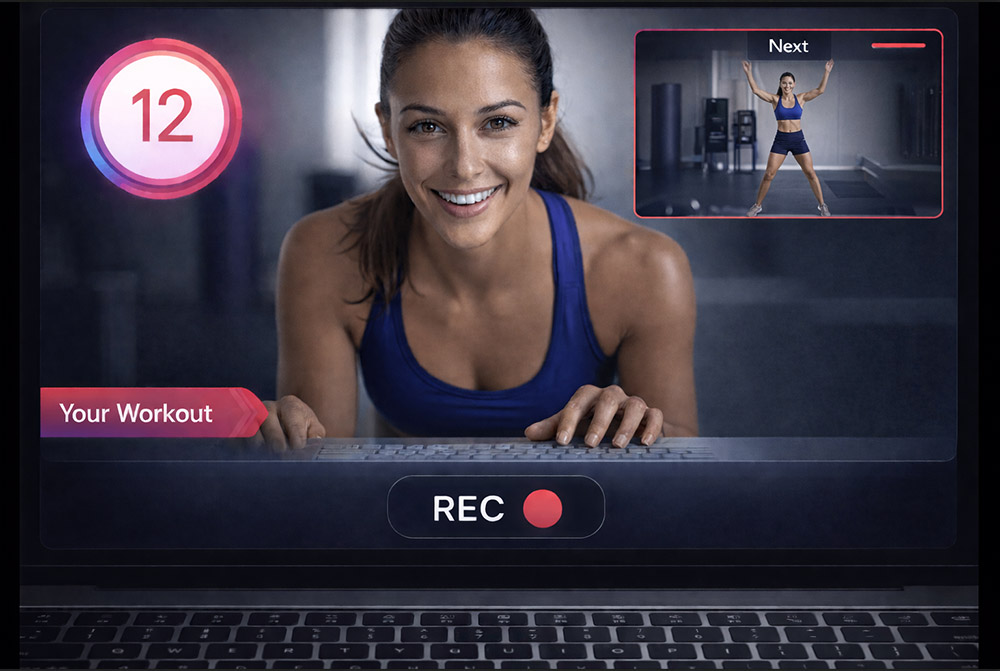
Real-time Workout Recorder/Editor
Record in front of your camera while your fitness routine plays alongside and is edited as you go. You end the workout with a fully edited video — something no HIIT timer app offers.
Your Fitness Class to a Workout Video in a Click
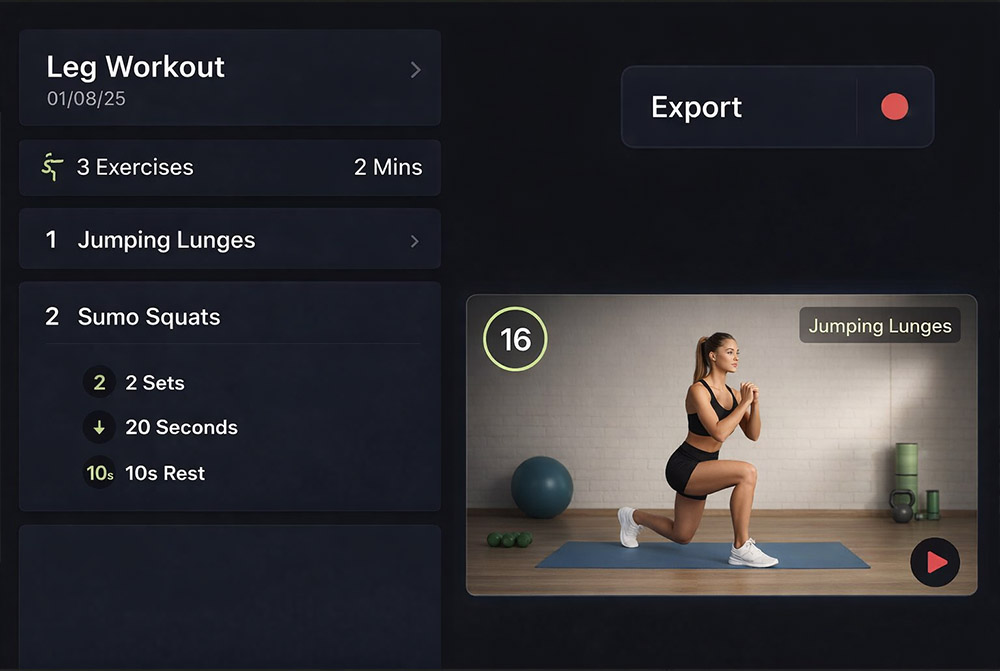
Build your workout plan with exercises, sets, and durations; upload footage; export a polished video. A Seconds Pro timer is just the beginning.