UPDATED SEPTEMBER 2026

The 8 Best Workout Video Makers for Personal Trainers

Short answer: for follow-along workout videos with countdown timers, Fit Cut Pro is the only maker in this list that generates the timers, exercise labels and rest screens from your workout plan or from a recording you already filmed. General editors such as CapCut, iMovie, Canva and Premiere Pro can make the video but need every timer placed by hand, and interval timer apps count sets without producing a video.

We compared eight tools trainers actually use to make workout videos, from free phone apps to professional suites, and ranked them on the things that decide whether you publish weekly or burn out: automatic timers, exercise labels, branding, reuse of your footage, time per video and price.

Short version: if you want full creative control, pick Premiere Pro or DaVinci Resolve. If you want to edit on your phone for free, pick CapCut. If you want finished workout videos with timers and branding in minutes, pick Fit Cut Pro. Details below.

How we judged them

Automatic interval timers

Does the tool generate countdowns and rest screens from the workout, or do you animate each one?

Exercise labels and branding

Exercise names, next-up cues, logo and colours applied consistently without manual title cards.

Reuse of your footage

Can one exercise clip serve every future video, or does each video start from an empty timeline?

Time per finished video

Measured for a typical 40-minute session with 30 to 60 intervals.

Price

Subscription or free, and what the free tier actually lets you export.

Workout video makers at a glance

ToolBest forAuto timersBuilt for fitnessTime to a finished videoPrice
1. Fit Cut ProTrainers and gyms that publish workouts every weekMinutesFrom $49.99/month, 14-day free trial, no credit card
2. CapCutFree editing on a phone, Reels and TikTokHours per full workoutFree; CapCut Pro subscription for premium features
3. CanvaTrainers who already design in CanvaHours per full workoutFree; Canva Pro subscription
4. iMovieFree, simple editing on Mac and iPhoneHours per full workoutFree
5. Veed.ioBrowser editing with subtitles and resizingHours per full workoutFree tier; paid plans
6. KapwingTeams collaborating on social clipsHours per full workoutFree tier; paid plans
7. Adobe Premiere ProFull creative controlWeeks to learn, hours per videoSubscription, around $22.99/month
8. DaVinci ResolveFree professional-grade editingWeeks to learn, hours per videoFree; DaVinci Resolve Studio one-time purchase
#1 · Best for Trainers and gyms that publish workouts every week

Fit Cut Pro

Price: From $49.99/month, 14-day free trial, no credit card

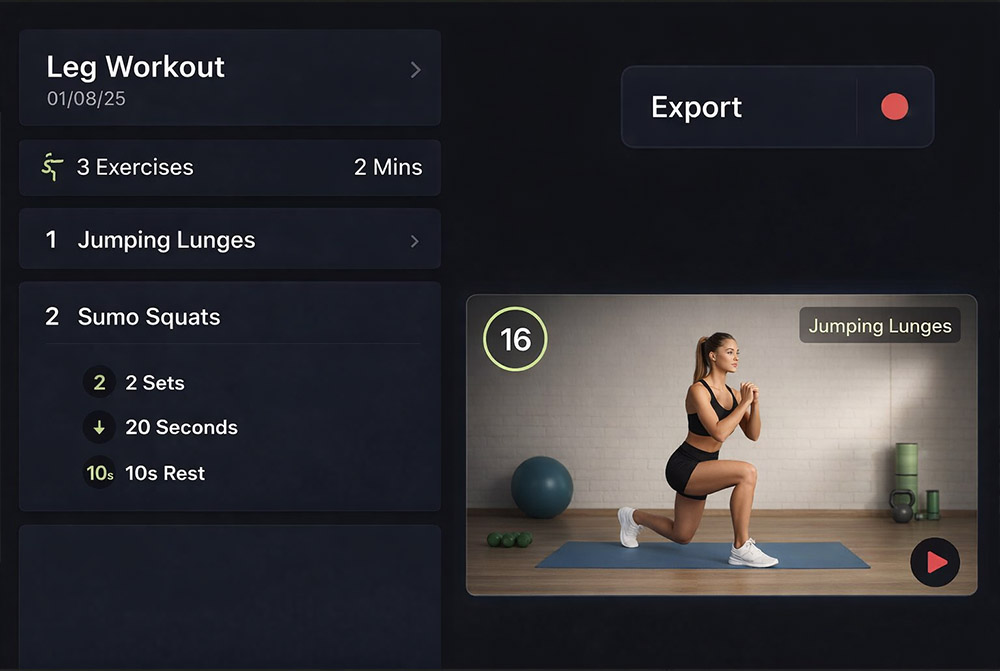
Fit Cut Pro is a workout video maker rather than a general editor. You build a workout plan (exercises, sets, seconds, rest, rounds), point it at your exercise clip library, and it produces the finished video: countdown timers, exercise names, next-up previews, rest screens, transitions, logo and licensed music, exported as an MP4 in up to 4K. A Recorder does the same while you film yourself, and a Zoom app overlays the timer on your live camera.

Where it shines

  • Timers, labels and branding generated automatically from the plan
  • Exercise clips uploaded once and reused across every video
  • Recorder for filmed sessions and Zoom app for live classes
  • Licensed music library, 4K export, portrait for Reels
  • Runs in the browser, no install

Where it falls short for workout videos

  • Not a timeline editor: no colour grading, multi-cam or cinematic B-roll
  • Desktop browser only, no phone editing
  • Subscription pricing rather than a free tier
See the workout video editor
#2 · Best for Free editing on a phone, Reels and TikTok

CapCut

Price: Free; CapCut Pro subscription for premium features

CapCut is the most popular free editor for short social video, and for good reason: it is fast on a phone, has strong templates, automatic captions and effects, and exports vertical video without fuss. For a 30-second exercise demo or a talking-head tip, it is hard to beat.

Where it shines

  • Free, with a generous feature set
  • Excellent on mobile, quick vertical exports
  • Auto captions and trending templates

Where it falls short for workout videos

  • Every timer is a manual countdown sticker or text layer, one per interval
  • No concept of a workout plan; each video starts from scratch
  • Watermark and some features locked behind CapCut Pro
Fit Cut Pro vs CapCut
#3 · Best for Trainers who already design in Canva

Canva

Price: Free; Canva Pro subscription

Canva added video editing to its design suite, and if your thumbnails, posts and PDFs already live there, it is convenient to cut short workout clips in the same place. Brand kits keep colours and fonts consistent, and the template library is enormous.

Where it shines

  • Brand kit and templates for consistent social graphics
  • Very easy to learn
  • Great companion for thumbnails and posts

Where it falls short for workout videos

  • Video tools are basic; long sessions get slow and fiddly
  • No interval timers or exercise automation
  • Export limits on the free plan
Fit Cut Pro vs Canva
#4 · Best for Free, simple editing on Mac and iPhone

iMovie

Price: Free

iMovie ships free with every Mac and iPhone and is the gentlest introduction to editing. Trimming a recorded class, adding a title and exporting to YouTube takes a few minutes and costs nothing.

Where it shines

  • Free and already installed on Apple devices
  • Simple, stable, decent titles and transitions
  • Good enough for trimming recorded sessions

Where it falls short for workout videos

  • Apple only
  • Timers and exercise labels are manual title cards
  • Limited overlays and no reuse across videos
Fit Cut Pro vs iMovie
#5 · Best for Browser editing with subtitles and resizing

Veed.io

Price: Free tier; paid plans

Veed.io is a browser-based editor built around social repurposing: automatic subtitles, one-click resizing between 16:9, 1:1 and 9:16, and simple text overlays. Trainers use it to caption and reformat recorded content.

Where it shines

  • Runs in the browser on any computer
  • Strong automatic subtitles
  • Fast resizing for different platforms

Where it falls short for workout videos

  • General-purpose; timers are manual text
  • Watermark on the free plan, tiered pricing
  • Long workout edits are slow in a browser timeline
Fit Cut Pro vs Veed.io
#6 · Best for Teams collaborating on social clips

Kapwing

Price: Free tier; paid plans

Kapwing is another browser editor, with a focus on collaboration: shared workspaces, comments and brand assets, plus subtitles and templates. Studios with a marketing person on the team tend to like it.

Where it shines

  • Team workspaces and shared assets
  • Browser-based with templates and subtitles
  • Reasonable free tier for short clips

Where it falls short for workout videos

  • No fitness features; timers and labels by hand
  • Free tier limits on length and resolution
  • Not designed for 45-minute sessions
Fit Cut Pro vs Kapwing
#7 · Best for Full creative control

Adobe Premiere Pro

Price: Subscription, around $22.99/month

Premiere Pro is the industry standard. Multi-camera edits, colour grading, motion graphics through After Effects, every effect you can imagine. If your workout videos are part of a larger production, it is the right tool for the production.

Where it shines

  • Unlimited creative control
  • Multi-cam, colour, audio and motion graphics in one suite
  • Huge ecosystem of templates and tutorials

Where it falls short for workout videos

  • Steep learning curve
  • One to three hours per workout video, every time
  • Around $22.99 a month plus the cost of your time
Fit Cut Pro vs Adobe Premiere Pro
#8 · Best for Free professional-grade editing

DaVinci Resolve

Price: Free; DaVinci Resolve Studio one-time purchase

DaVinci Resolve gives you a Hollywood-grade editor, colour grader and audio suite for free, with a paid Studio version for advanced effects. It is the best free tool on this list for people who want to learn real editing.

Where it shines

  • Free, with professional colour and audio tools
  • One-time purchase for Studio, no subscription
  • Scales from simple cuts to feature films

Where it falls short for workout videos

  • The heaviest learning curve here
  • Needs a capable computer
  • Zero fitness-specific tooling
Fit Cut Pro vs DaVinci Resolve

How to choose the right workout video maker

You publish a class or programme every week. Time per video is the only number that matters. Choose a tool that generates timers and labels from the plan, which today means Fit Cut Pro, and keep a free editor around for the occasional promo.

You mostly post 30-second clips from your phone. CapCut. Add Canva for thumbnails. Revisit the list when you start producing full sessions.

You are a videographer or you have one. Premiere Pro or DaVinci Resolve for the production, and a workout-specific tool for the interval-heavy sessions so the editor's hours go to the creative work.

You teach live on Zoom. None of the editors help during the class. You need a timer overlay on your camera, which is a separate feature: see the Zoom workout timer app.

Fit Cut Pro workout video maker with a workout plan on the left and the generated video preview on the right

Frequently asked questions

Trainer voices

What trainers
are saying.

100% genuine testimonials from online trainers using Fit Cut Pro every week.

Fit Cut Pro helps me create 5 workouts a week, in a few minutes. You should really give it a go.

Mathieu

Online Personal Trainer

No need for that extra editing! It takes 5 minutes to create a workout! It's so easy to use!

Deidre

Personal Trainer

I highly recommend this program; the timer, countdown, and custom logo look very professional.

Helen

Personal Trainer

Fit Cut Pro made my online classes look more professional and organized. My clients love it!

Pedro

Fitness Coach

Recording workouts is so easy now—no more video editing hassles. I save so much time!

Michela

Personal Trainer

Fit Cut Pro saved me lots of time and it looks really professional and my clients have been really enjoying it.

Maggie

Personal Trainer

Our pick for trainers

Make your next workout video in five minutes

Try Fit Cut Pro free for 14 days: the Workout Creator, the Recorder, licensed music and the Zoom timer app. No credit card.