How do I livestream a workout class to YouTube with timers on screen?
Short answer: Teach the class in Zoom with the Fit Cut Pro Workout Timer & Overlays app running, then stream the meeting with Zoom’s built-in Live on YouTube option. The app draws the countdown timer, exercise name and your logo onto your camera feed, shows your exercise clips during rests, and shares the transition beeps into the meeting audio, so YouTube viewers see and hear the same class your Zoom participants do. You need a paid Zoom plan (live streaming is not available on Zoom Basic), live streaming turned on for your YouTube channel (the first activation can take up to 24 hours), and a Fit Cut Pro plan: the Zoom app is included in every plan from $49.99 per month and in the 14-day free trial.
How it works
- 1
Allow live streaming in Zoom
Sign in at zoom.us, open Settings, then Meeting, and under In Meeting (Advanced) turn on Allow livestreaming of meetings and tick YouTube. On a company Zoom account the admin may need to switch it on for you.
- 2
Turn on live streaming on YouTube
In YouTube Studio, click Create and then Go live. YouTube asks you to verify the channel with a phone number; the first activation can take up to 24 hours, so do it at least a day before your first streamed class.
- 3
Load your workout in Zoom
Start the meeting and your camera, open Apps and choose Workout Timer & Overlays, log in with your Fit Cut Pro email and password and pick the workout. When Zoom asks to share your computer sound, allow it: that is how the beeps reach everyone, YouTube included.
- 4
Keep the stream on you
Zoom streams the active speaker. If participants unmute, the stream can jump to them, so spotlight your own video (or mute participants on entry) and it stays on you and the timer.
- 5
Go live, then press play
Click More, then Live on YouTube. Zoom opens your browser to sign in with Google, pick the channel, set the title and privacy (public, unlisted or private) and go live. When the LIVE label shows in the meeting, start the workout in the app.
What YouTube viewers see and hear
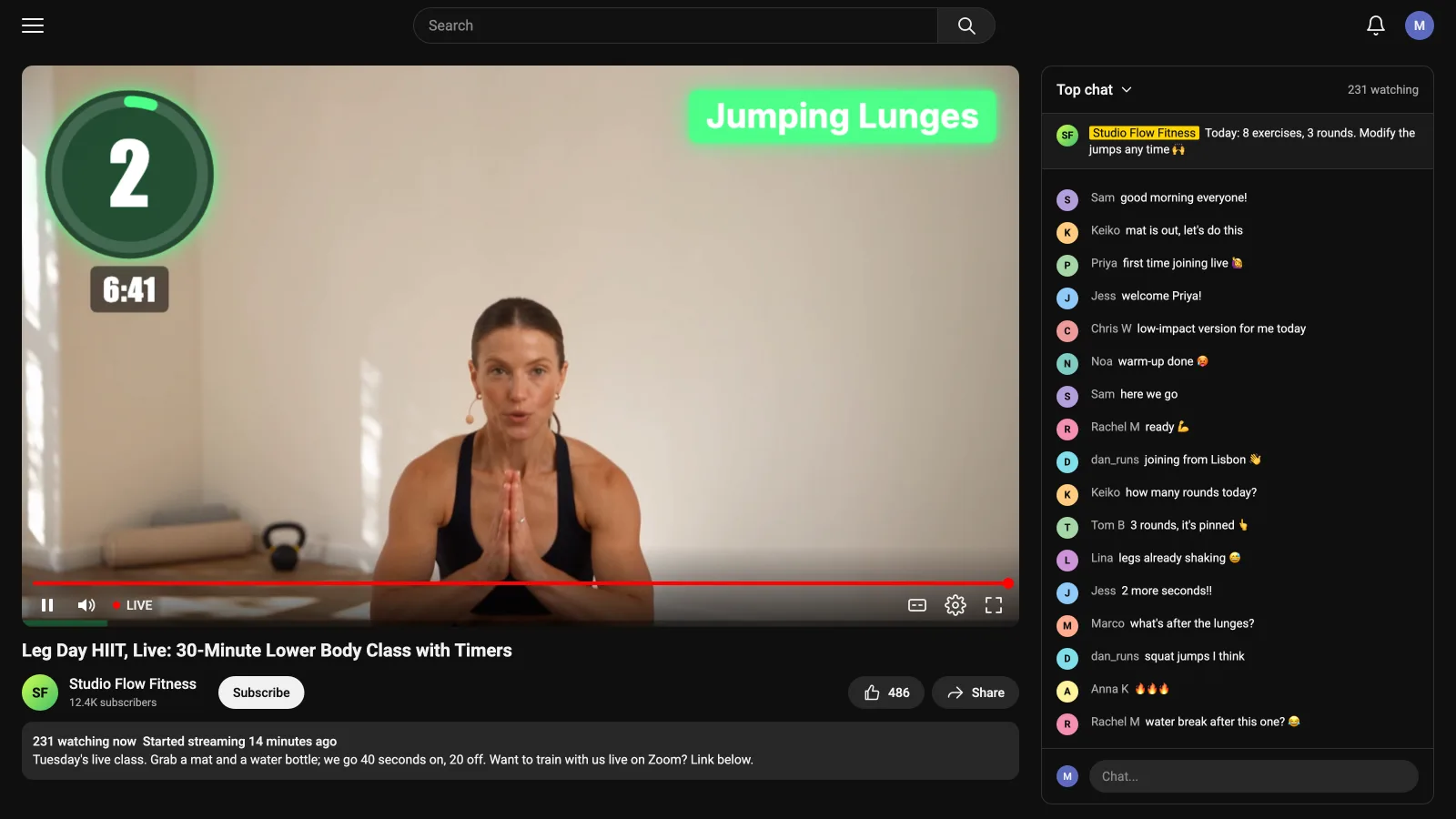
The same picture your Zoom participants get: you on camera with the countdown ring, the workout clock, the exercise name and your logo in your brand colours. During rests the app shows the clip of the next exercise from your Fit Cut Pro library, so people at home know what is coming. The 3-2-1 beeps are in the audio.
YouTube runs a little behind the room, typically several seconds and sometimes up to half a minute. Coach your Zoom group as usual and read the YouTube chat for questions; anyone who needs to keep pace with you in real time should join the Zoom call instead.
Music on a YouTube stream
The Zoom app plays the timer beeps, not music. If you play music on your computer while sharing computer sound, it goes into the stream too. YouTube checks live streams for copyrighted music and can mute, interrupt or claim a stream that plays commercial tracks, so use music you have the rights to stream, or stream with the beeps and your voice only.
Public, unlisted or private
Public streams can be found in search and on your channel, which suits free classes that bring in new clients. Unlisted streams are watchable only by people with the link, which works for paying members, though anyone you share it with can pass it on. After the stream ends, YouTube keeps the recording on your channel with the same privacy, timers included, so it doubles as an on-demand class.
Streaming without Zoom
Fit Cut Pro does not have its own Go live on YouTube button: Zoom is the route for streaming with the timers. If you do not need to be live, the Recorder in the web app records you with the same timer overlay to an MP4 you upload as a normal video, and the AI Editor adds timers to a class you filmed without them.
Frequently asked questions
- Do I need a paid Zoom account?
- Yes. Zoom’s live streaming to YouTube needs a Pro, Business or higher licence; it is not available on Zoom Basic.
- Do YouTube viewers need to install anything?
- No. They watch a normal YouTube live stream; the timer and exercise names are part of the video.
- Do my Zoom participants still see everything?
- Yes. Streaming to YouTube does not change the meeting. Participants see and hear the same class.
- Can I stream to Facebook instead?
- Zoom can also stream a meeting to Facebook or to a custom streaming service. The overlay is part of your camera feed, so it goes out the same way.
- Is the stream saved?
- YouTube saves the stream on your channel when it ends, with the timers in the picture. Change its privacy or delete it in YouTube Studio.
- Is the Zoom app in the free trial?
- Yes. Workout Timer & Overlays is included in the 14-day free trial and in every plan from $49.99 per month.